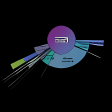
Create a graphical display of your hard drive's contents
New warning messages when scan errors occured.New "image rotation" capability (you can rotate the graph as you want).New "text density" setting (you can change the text density in real time).New tooltip available when the mouse is hovered a directory.Count the number of files in a directory (see the "Directory Details" form).New commande line argument to set output image size.Better resize mode (preview during resize, real redraw when resize finished)Asynchronous draw for complicated graphs (which take a long time to draw), to avoid application freeze.Main window state is memorized on exit (or the size if the window is not maximized).Performance improvements
Changes
New warning messages when scan errors occured.New "image rotation" capability (you can rotate the graph as you want).New "text density" setting (you can change the text density in real time).New tooltip available when the mouse is hovered a directory.Count the number of files in a directory (see the "Directory Details" form).New commande line argument to set output image size.Better resize mode (preview during resize, real redraw when resize finished)Asynchronous draw for complicated graphs (which take a long time to draw), to avoid application freeze.Main window state is memorized on exit (or the size if the window is not maximized).Performance improvements












.jpg)














User reviews about HDGraph
Have you tried HDGraph? Be the first to leave your opinion!